Showing posts with label Geek world. Show all posts

Thursday, 11 July 2019

Best Ethical Hacking Forums And Websites | Top 5 Forums for Ethical Hacker

Well, Everybody wants to be a Hacker nowadays and want to come in the field of Hacking. However, this is not an easy task until you have basic knowledge about Computers and Network Security. If you want to know more about how to start your hacking carrier and how to be a hacker then click on the following link...

How to be an Ethical Hacker | Step by Step guide...


Today I am gonna provide a list of Top 5 Best Ethical Hacking Websites and Forums so let's start now and yaa remember one thing as a beginner to not perform any Hacking & Cracking tactics that breach any Cybersecurity law, So be safe and here we go, and what do you have to do is go to the website and join them.

1. Hack Forums : 

Hack Forums (often shortened as HF) is an internet forum and a very popular destination for Hackers and Script kiddies. Many users remain active at all the time here and a lot of things happen to be shared like as Crypters, Rat, Script, etc. and many more Hack tools.


Official website - Hack Forums

2. Level23 Hack Tools :

This forum is used to share knowledge about Malware modification, Hacking, Security, Programming, Cracking, among many other things. There you can also find many hacking tools like Remote administrator tools, Crypters, Stealer, Binder, Botnets, Trojans, etc.

Also, Read - What's a Computer Virus...


Official website - Level23 hack tools

3. Hackaday: Fresh Hacks Every Day

Hackday is one of the top-ranked websites that provide Hacking news and all kind of tutorial for Hacking and Networks. It also publishes several latest each day with detailed description about hardware and software hack so that beginners and hackers aware of it. Hackaday has also a YouTube channel where they post projects and how-to-do videos.


Official Website - Hackaday


Also, Read - What's Dark web | Deep web vs Dark web

4. 0x00sec - The Home of the Hacker : 

These Hacking forums allow you to see the discussion on Hacking and Cracking. However, you need to be a member of the site to check out queries and answers regarding Ethical hacking. This is also known as The Home of the Hacker, here you can find kinds of stuff related to Hacking, Cracking, Reverse Engineering, Computer Science, etc.


Official Website: 0x00sec

5. Hack This Site : 

HackThisSite.org commonly referred to as HTS is a legal and safe network security resource where the user tests their skills on the various challenge and learn much more about them. The organization has a user base of over a million, though the number of active members is believed to be much lower.


Official website - HackThisSite

So, guys, you have to go and join them and start learning and don't forget to share with others. Thank you.

You can also join our Facebook page and Subscribe us on YouTube

Wednesday, 3 July 2019

What is a computer virus | Type of computer virus | Computer virus names

What is a Computer Virus :


A computer virus is a type of malicious program, script or macro designed to cause damage, steal personal information, modify data, send e-mail, display messages, or some combination of these actions. Computer viruses never occur naturally. They are always induced by people. Once created and released, however, their diffusion is not directly under human control.


What is a computer virus | Type of computer virus | Computer virus names


 After entering a computer, a virus attaches itself to another program in such a way that execution of the host program triggers the action of the virus simultaneously. It can self-replicate, inserting itself onto other programs or files, infecting them in the process. Not all computer viruses are destructive though. However, most of them perform actions that are malicious in nature, such as destroying data. Some viruses wreak havoc as soon as their code is executed, while others lie dormant until a particular event (as programmed) gets initiated, that causes their code to run in the computer.

The Creeper virus was the first virus detected on ARPANET, in the early 1970s, Written by Bob Thomas of BBN Technologies and spread through DEC PDP-10 displaying the message, "I'm the creeper, catch me if you can!".

The Elk Cloner, written in 1982 by the 15-year-old rich skrenta of pittsburgh, was a Boot-Sector virus designed to infect Apply || computers and was the first to detected in the wild.

Brain, created in Pakistan in 1896, was the first PC virus to be found in the wild 

Also, read: Deep web Vs Dark web | How to access Dark web


How does a Computer virus reach you?

Different type of computer viruses reaches at you through the typical web activities.

1. Opening email attachments from fake accounts.

2. Clicking an inappropriate advertisement and link without understanding fully.

3. Installing or Downloading the free games, toolbars or System utilities firm any website.

4. Visiting an infected web page.

5. Inserting or Connecting the infected device and disk.

6. Installing pirated software.

7. Setting up of software without licensing agreements.

Types of Computer Viruses :

There's a lot type of computer viruses exist here, thus we can't mention everyone but here is a list of the famous type of computer viruses...


What is a computer virus | Type of computer virus | Computer virus names


1.Boot sector Virus 

A Boot Sector is the part of our PC's hard drive that loads our computer's operating system. When a system has booted the code in a boot sector will always run first.

Also, read: What is Botnet and how it works...

A Boot Sector(also known as Boot infector or MBR virus) infects the Master Boot Record(MBR), so the virus loads on the computer memory during startup. 

This virus is attached with our system files i.e. ".exe", ".com" or ".dll"(Dynamic link libraries) files. When the user uses these files, the virus performs destructive operations and destroy all data files.

What is a computer virus | Type of computer virus | Computer virus names


Boot Sector Virus Examples :

Here is an example of a few most vulnerable Boot Sector Virus...
Anti Exe.
Polyboot.
Brain.
Parity Boot.

2.Macro Virus

First of all, we have to know about what's Macro, Well Macro is a set of recorded keystrokes, Mouse movements and so on that are designed to make your life easier, reduce repetitive typing and so on.

A Macro Virus is a type of Computer virus that hides within the macros used in a program(like as MS Word, MS Excel,etc.).Macro is an executable program thus it can be infected by viruses just like other executable programs.
What's unique about a Micro Virus is user typically don't suspect that a document will contain a virus. Whenever the user opens such files The Micro Virus perform pre-define destructive functions. These viruses may change or erase all the data of any document.

Also, read: How to be an Ethical hacker and start your hacking carrier...

Micro Virus Examples : 

Here's an example of a few Micro Viruses which are most vulnerable...
Relax. 
Bablas. 
Y2K.

3.Memory Resident Virus 

That is a type of virus which infect RAM memory and also hide and store itself within the Computer memory which then allow it to infect any file that is run by Computer, depending on virus programming. 

It can execute whenever the os load and the worst part is that it can execute even when you remove the original infected program or no longer running. 

Resident Virus Example :

CMJ.
Meve.
MrKlunky.
Randex.

4. File Virus


File Virus ( Parasitic Virus)  use an arbitrary existing file as Host. Usually, the virus prepends the body of its code to the beginning of the file or append the body of it's code to the end of the host file,  in which case the original file contents remain intact except the original entry point(OEP) is modified.

The simplest File Virus works by locating a type of file they know how to infect (usually a file name ending by .com or .exe and .dll files also) and overwriting part of the program they are infecting. When the program is executed, the virus code executed and infect more files, after the execution of its code the control return back to the main program and its execution is not even noticed thus everything appears normal. It's also called Parasitic Virus because it leaves no file intact but also leave host functional.  

Examples of File Viruses :


Cascade.
Jerusalem. 


5.Multipartite Virus 

This is a fast-moving virus and a kind of virus which can infect and spread in multiple ways. It can infect both Programs and System Sectors.

Multipartite Virus increases their chance of spreading within the computer by combining feature from both the File Virus and the Boot-Sector Virus thus these viruses easily infect both files and boot sectors simultaneously allowing them to act quickly and spread rapidly, Because of this, the chance of spreading the virus is increased.
The Multipartite Virus are often tricky and hard to eliminate.
The worst part is that even if you've succeeded in removing all the infected files from your computer, the virus still is hidden in boot-sector and ready to strike again as soon as you boot your system, and if you clean the boot-sector then and the files is still infected then the virus will re-infect the boot-sector by jumping from one of the infected files.

Example of Multipartite Virus :

Junkie Virus.
Tequila Virus.
Invader Virus.

Also, read - What's Firmware and how it works...

So guys if you like our post then don't forget to share with others and also join our FB page Jeetech.

Comment below if you have any problem regarding this post or let us know about your experience...Thank you💓.


Friday, 7 June 2019

Deep web Vs Dark Web | Is the Dark web is illegal | How to Access Dark web

Deep Web Vs Dark Web: This is the major confusion between the majority of us Interpreting that the dark web and deep web same. Both these deep and dark web are completely different though their existence a similarity that we can’t google it any info from both of them.

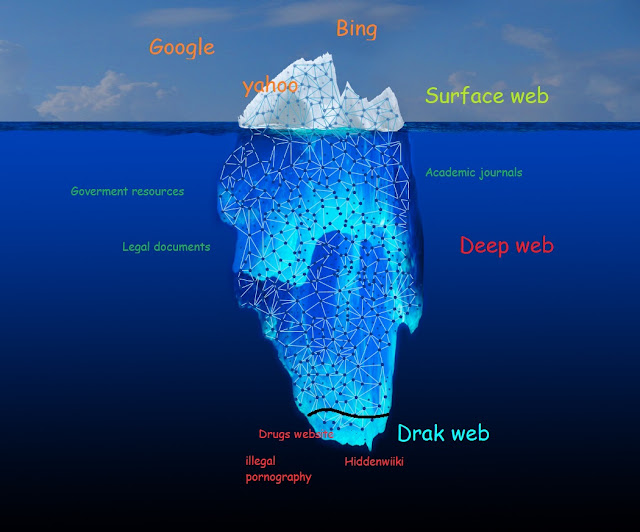
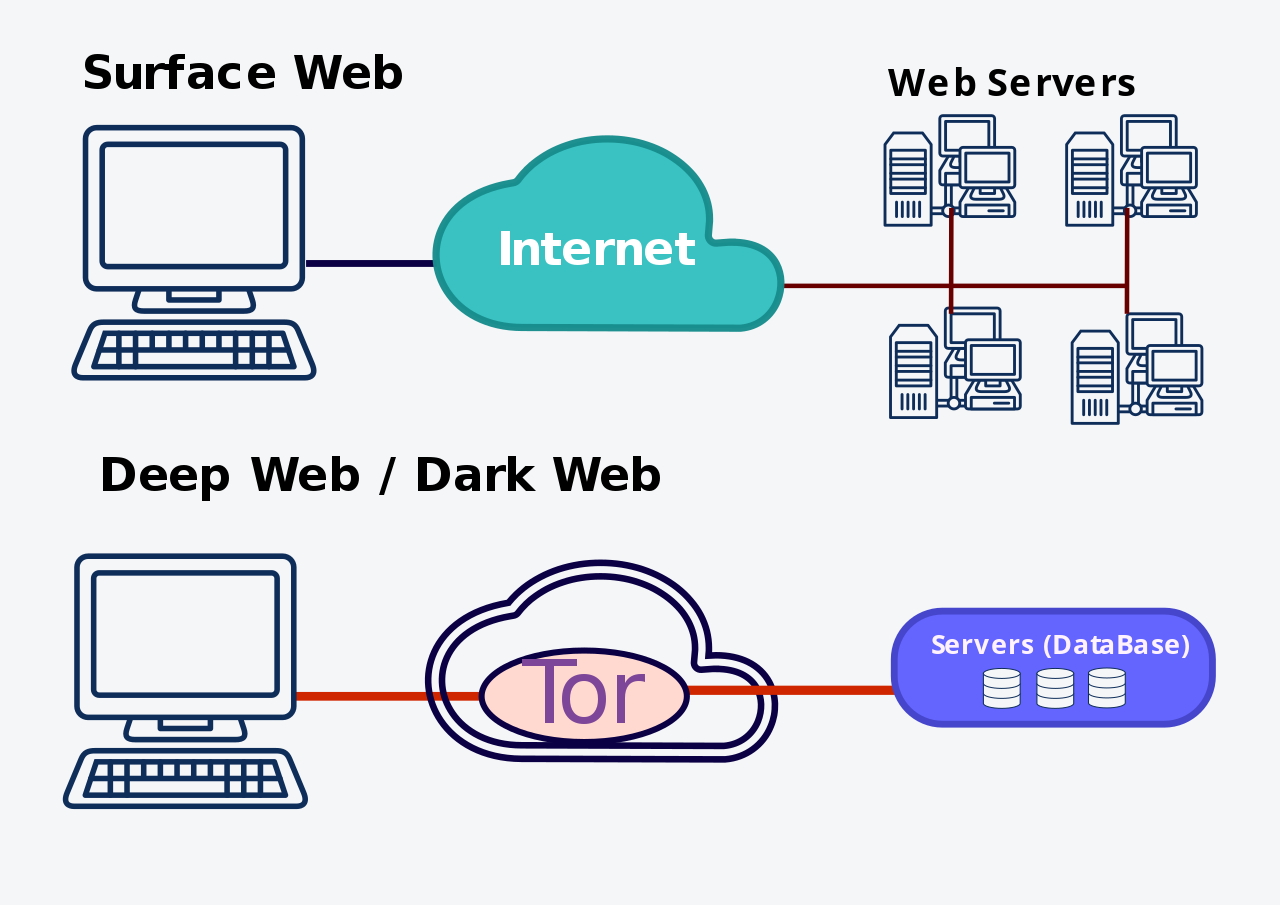
The Web is divided into 3 layers:

1.Surface web.
2.Deep Web.
3.Dark web.


Deep web Vs Dark Web | Is the Dark web is illegal | How to Access Dark web
Internet Divided into Three Parts


Surface Web


Let me tell you one thing, if you are reading this blog then you are exploring the surface part of the web. The websites, web pages, and information that you find using a web search engine like Google, Yahoo, Bing, etc. Normal users are restricted to use only the surface part of the web. The shocking thing is that the surface web is only 4% of the whole internet!! For Accessing  Surface Web Just search something in any search engine either Google or Yahoo or any other platform, so this is a surface web, even Google is a part of the surface web.

Also, Read What Is Botnet? How it works, Botnet Attacks

Deep web 


The Deep web is a subset of the Internet which isn’t indexed by the major search engines. This means that you have to visit those places directly instead of being able to search for them on the internet or search engine. So there aren’t directions or any way to get there, but they’re waiting if you have an address. The Deep Web is the largest part of the Internet. It is 96% of the whole Internet. For Accessing The Deep Web You will require the exact address or URL of these pages because they are not indexed and can’t be searched with your search engine.


Deep web Examples: Online cloud storage like Google Drive, Dropbox, is the basic example of the Deep web. 


Dark web


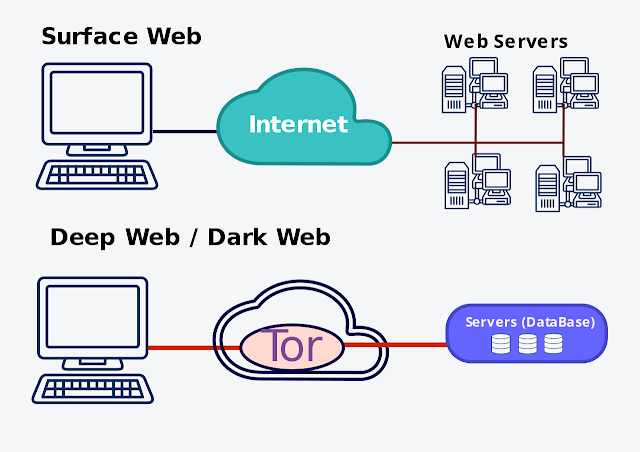
Now, this is something that has the majority of people are unaware of it and it's also known as Darknet. A subset of the Deep Web that is not only not indexed, but that can also require something special to be able to access it, like as specific proxying (TOR Browser software and authentication(If needed) to gain access to these types of websites. These pages also require additional sub-network like Freenet, I2P, TOR, Elite Proxy Switcher. These and it is often associated with the criminal activity at various degrees, it also including buying and selling Drugs, Gambling, Weapons, Hitman, etc. 

Also, Read How to be a Hacker, Start your Ethical hacking carrier...


Is the Dark web is illegal: The dark Web is popular for both the black market and user protections, so it has both the positive and negative aspects. If you are working with some negative things so it's illegal but on the other hands' Dark web is also too secured, It is not that easy to find their server details on which their corresponding site is running, and it is difficult to track their hosting site and IP addresses. This Web ensures that one’s privacy by effectively hiding the server and their IP details from the public.

The industries which operate over the Dark web is also known as Draknet Markets. This also includes the Black Market sales of illegal products, to stay hidden from the governments and law of enforcement agencies. The Dark Web is also used in other ways, just like communication between whistle-blowers and protecting users from attacks or from the surveillance to ensure privacy in the communication, But the Dark Web is mostly used in Black Markets as it promises total Anonymity. 


How to Access the Dark web: The Dark web links always end with ".onion".For Access Drak web links, first of all, you have to install TOR Browser and a VPN or any IP address switcher.

Deep web Vs Dark Web | Is the Dark web is illegal | How to Access Dark web
Accessing the Internet

So, guys, I hope you like our post and don't forget to share with your friends and others. Thank You❤

Also, Join our Facebook Page Jeetech World and Subscribe our Youtube Channel Jeetech.

Monday, 20 May 2019

What Is Botnet,How it works : Botnet Attacks, How To Stay Protected With It

Hey, guys today I am gonna describe what's Botnet, How it works and how to be stay protected with it.

So keep reading Carefully and don't forget to share with your friends...
What Is Botnet,How it works : Botnet Attacks, How To Stay Protected With It

The word Botnet or bot is short for robot network. The bots are software that is used to control the target remotely and to execute predefined tasks. It is capable to run automated scripts over the internet. The bots are also known as Internet Bot or Web Robot. 


What Is Botnet,How it works : Botnet Attacks, How To Stay Protected With It
Botnet-attack


Combination of the functionality of Robot and Network develop a continuously working Botnet on a repetitive task. It is the basic fundamental of a bot. They are known as the workhorses of the Internet. These Botnets perform repetitive tasks. The most often of Botnets are in connection with Internet Relay Chat. These types of Botnets are legal and beneficial.


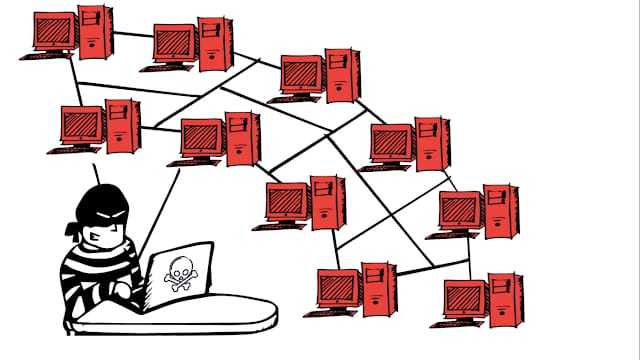
A Botnet may use for positive intentions but there also some Botnets which are illegal and intended for malicious activities. These malicious Botnets can gain access to the systems using malicious scripts and codes either by directly hacking the system or through "Spider." Spider program crawls over the internet and searches for holes in security. Bots introduce the system on the hacker’s web by contacting the master computer. It alerts the master computer when the system is under control. Attacker remotely controls all bots from the Master computer.

Also Read: Difference Between 32 bit And 64 Bit OS
A Botnet is a group of Internet-connected personal computers that have been infected by a malicious applica­tion (malware) that allows a hacker to control the infected computers or mobile devices without the knowledge of the device owners. When malware is launched on your computer or mobile device, it “recruits” your infected device into a Botnet, and the hacker is now able to remotely control your device and access all the data on your device.
 A Botnet is a number of Internet-connected devices, each of which is running one or more bots. It's a large scale of the compromised system. This compromised system is not limited to just LAN it can be spread on over the internet.  Botnets can be used to perform distributed denial-of-service attack (DDoS attack), steal data, send spam, and allows the attacker to access the device and its connection.
What Is Botnet,How it works : Botnet Attacks, How To Stay Protected With It
Botnet-attacks


Also Read: Best Android Apps For Start Hacking
A Botnet can consist of as few as ten computers, or tens or hundreds of thousands. Millions of personal computers are potentially part of Bot­nets. Computers that aren’t properly secured are at risk of being turned into bots, or zombies.
What Is Botnet,How it works : Botnet Attacks, How To Stay Protected With It
Botnet Structure

Consumers’ and small businesses’ relaxed security practices give scammers a base from which to launch attacks, by allowing them to create Botnets without being detected. Hackers use Bot­nets to send spam and phishing emails and to deliver viruses and other malware and thus make money.
To stay protected, you should:


  • Don’t click on links from people you don’t know
  • Be cautious downloading content from peer-to-peer sites
  • Be wary of free downloads (is it really free?)
  • Keep your operating system and browser updated
  • Make sure you have updated security software for all your devices. Like as McAfee and Kaspersky...
 
What Is Botnet,How it works : Botnet Attacks, How To Stay Protected With It
Stay-Safe-From-Botnet


So guys if you have any suggestion or confusion then comment below... And don't forget to share and also join our FB page...Jeetech World

Sunday, 5 May 2019

How To Become A Hacker And Start Ethical Hacking Carrier | Step by Step Guide


Hey, guys today I am going to tell you some basic but very important points to be a Hacker, so keep reading and share with your friends...

How to become a Hacker

How to Become a Hacker :


Hacking is an engaging field but it is surely not easy. To become a hacker one has to have an attitude and curiosity of learning and adopting new skills. You must have a deep knowledge of computer systems, programming languages, operating systems and the journey of learning goes on and on.

Some people think that a hacker is always a criminal and do illegal activities but they are wrong. Actually many big companies hire hackers to protect their systems and information and are highly paid. here is the list of most important steps necessary to become a hacker, have a deeper look

Steps:


Learn UNIX/LINUX :

UNIX/LINUX is an open source operating system which provides better security to computer systems. It was first developed by AT&T in Bell labs and contributed a lot in the world of security. You should install LINUX freely available open source versions on your desktops as without learning UNIX/LINUX, it is not possible to become a hacker. .

Start coding in C language :


C programming is the base of learning UNIX/LINUX as this operating system is coded in C programming which makes it the most powerful language as compared to other programming languages. C language was developed by Dennis Ritchie in the late 1970s. To become a hacker you should master C language.

Also Read: What is Firmware and How it Works?

Start coding in more than one Programming Language :


It is important for a person in the hacking field to learn more than one programming. There are many programming languages to learn such as Python, JAVA, C++. Free eBooks, tutorials are easily available online.

Learn Networking Concepts :


Another important and essential step to becoming a hacker is to be good at networking concepts and understanding how the networks are created. You need to know the differences between different types of networks and must have a clear understanding of TCP/IP and UDP to exploit vulnerabilities (loopholes) in the system. Understanding what LAN, WAN, VPN, Firewall is also important. You must have a clear understanding and use of network tools such as Wireshark, NMAP for packet analyzing, network scanning, etc.

Learn More Than One Operating Systems :

It is essential for a hacker to learn more than one operating system. There are many other Operating systems apart from Windows, UNIX/LINUX, etc. Every system has a loophole, the hacker needs it to exploit it.

Also Read:What is SQL injection ?

Learn Cryptography :


To become a successful hacker you need to master the art of cryptography. Encryption and Decryption are important skills in hacking. Encryption is widely done in several aspects of information system security in authentication, confidentiality, and integrity of data. Information on a network is in an encrypted form such as passwords. While hacking a system, these encrypted codes need to be broken, which is called decryption.

Learn more and more about hacking :


Go through various tutorials, eBooks written by experts in the field of hacking. In the field of hacking, learning is never ending because security changes every day with new updates in systems.

Experiment A Lot :

After learning some concepts, sit and practice them. Setup your own lab for experimental purpose. You need a good computer system to start with as some tools may require a powerful processor, RAM, etc. Keep on Testing and learning until you breach a system.

Also, Read : Best Hacking Apps For Android...

Write Vulnerability (Loophole program) :


Vulnerability is the weakness, loophole or open door through which you enter the system. Look for vulnerabilities by scanning the system, network, etc. Try to write your own and exploit the system.

Continue never-ending Learning :


Learning is the key to success in the world of hacking. Continuous learning and practicing will make you the best hacker. Keep yourself updated about security changes and learn about new ways to exploit systems.

Join Discussions and meet hackers :


Most important for a hacker is to make a community or join forums, discussions with other hackers worldwide, so that they can exchange and share their knowledge and work as a team. Join Facebook groups related to hacking where you can get more from experts.

So guys if you like our post then don't forget to share it and also check out our Facebook Page and YouTube Channel.

Friday, 3 May 2019

What is Firmware And How It Works ? Explained in details....

Hey, guys today I am going to introduce about Firmware. Basically, what's Firmware? how it works? and can we make some changes into our system Firmware...


Firmware
Firmware 


Firmware is essentially software, but one that interfaces with hardware. While the software we know is written to run on general purpose CPUs, the Firmware is written to run on special processors. There is not a lot different in the Firmware that software. While in the software you will be reading from std input (keyboard) and writing to std output (screen), in the Firmware you may be reading from a pin (ex. level of voltage) and writing to a pin (ex. changing voltage level). Or in software, you would read from a text file and write to a text file, in the Firmware, you will read from a memory block and write to a memory block.

In other hands, Firmware is the generally lightweight machine-level translation of the code, permanently stored in the device’s memory and acts as an OS analogous setup for the embedded system. It is a binary instruction set converted from the human-developed code and flashed down to the ROM or EEPROM of the device. Generally, the Firmware starts execution as soon as the controller is turned on and it is responsible for hardware interface and communication. It doesn’t do a lot of on the go processing, rather executes all the already compiled code.

Also, read: Windows vs Linux

Firmware is usually written in assembly, C/C++. One big difference in Firmware is that the execution of the program is highly deterministic. Firmware can be written to run only your program, nothing else. There are no background tasks. It only runs your code and your code only. This is very important to most Firmware, for example, like in automobiles, where you need to know absolutely that your piece of code is run when it should be run, without delay. In Firmware, you can know exactly how long it will take to execute a particular task, again because only your code is running. You can look at the disassembly of your code, count the instructions and know exactly how long it would take to do a particular task. This is something you cannot do with software running on a general purpose CPU on top of an OS. There are of course OS's for Firmware, RTOS (real-time OS), that somehow behave a little like a normal PC OS, but still with very low overhead. But when precision and timing is important, you write barebone firmware.

Also, read: Difference between 32 bit and 64 bit OS

Changing the Firmware of a device was rarely or never done during its lifetime in the past but is nowadays a common procedure; some Firmware memory devices are permanently installed and cannot be changed after manufacture. Common reasons for updating Firmware include fixing bugs or adding features to the device. This may require ROM integrated circuits to be physically replaced or flash memory to be reprogrammed through a special procedure. Firmware such as the ROM BIOS of a personal computer may contain only elementary basic functions of a device and may only provide services to higher-level software. Firmware such as the program of an embedded system may be the only program that will run on the system and provide all of its functions...

Check out our Youtube channel Jeetech.

 
biz.